
How to Choose AI Tools That Actually Save You Time
It starts with the task, not the tool.

Recently, I hosted a webinar about choosing tools as a solopreneur. One of the attendees commented:
“One concern is that, working solo, I am unable to stay on top of everything happening in AI. So I'm paranoid about not knowing about a tool that makes life easier or work more efficient.”
I acknowledged that that’s a completely valid concern. There's a new AI tool in your feed every week, each one promising to save time. But trying all of them is a time sink all by itself.
Having a framework before you start evaluating tools makes a huge difference. You evaluate whether a tool is actually worth your time or whether it's just another subscription (that you don’t need).
How do you choose the right AI tools for your business?
The best AI tool for your business is the one that removes a specific, repeatable task. Not the one with the most features or the most buzz.
When you're evaluating AI as a solopreneur, think of it this way:
- Do I save time?
- Is some manual work eliminated?
A tool that shaves minutes off something you do daily is worth a lot. According to Capsule CRM's research, roughly 55% of U.S. small businesses now use AI regularly — but using it regularly and using it effectively are different things.
That math changes if you need to spend hours and hours getting the tool set up the way you want, only to save a few minutes of time on a task you don’t do very often. It’s got to be something that compounds.
3 steps to choosing AI tools for your solo business
Before sitting down to evaluate anything new, it helps to have a framework or checklist you can run through quickly. This list keeps the decision grounded in your actual workflow instead of getting pulled toward whatever shiny new tool you just heard about.
1. Start with the tools you already use
Many tools you're already paying for have AI features built in, like Notion, Canva, your CRM, or even Google Workspace. These have the easiest starting points because there's no learning curve to the tool itself. You’re just adding AI to something you’re already doing.
For me, this was Airtable. Airtable AI (called field agents) is able to take actions on my database (like making a selection in a field) that I was previously doing manually. Field agents are easy to set up, and the time savings is immediate.
Some of these features you might not even realize you're paying for. And if you are paying extra for an AI tier and don't find the features useful, downgrade your plan.
2. Look for AI that solves a specific time problem
If you’re branching out from the tools you already pay for, start by finding a solution to a specific task, not a specific tool. Inbox triage and first-draft writing are common ones.
This is a step that most people skip. They hear about a tool, get excited, sign up… and then try to find a use for it. That's backward! If you can't point to a specific problem that you’re trying to solve, the tool is probably going to sit unused.
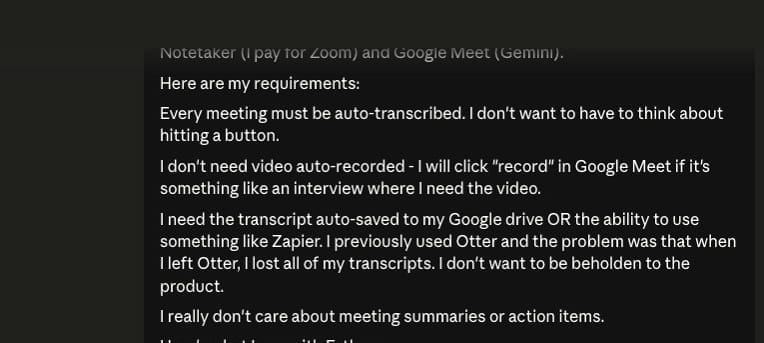
I often start with a chat conversation in Claude. I say “I’m looking for a solution to XYZ problem. This is what I need. What are my options?” Claude does the research for me, which is far faster and more personalized than doing it myself. Once I have a potential solution, I’ll visit the tool’s website and sign up for a free trial.
3. Evaluate based on how much manual work it eliminates
The real test: how much of the task actually disappears? Does it remove most of the repetitive task, or can it only handle part of it, and you still have your hands on the other part?
A tool that automates 80% of a weekly task is doing real work for you. One that automates 10% of an occasional task? That’s probably a distraction and something you have to “manage.” AI tools often need tweaking as new models become available or you want to refine the output.
For example, I use the Buffer* MCP for social media. Without AI, my process would be:
- Start with a blog post
- Write a few social posts based on my ideas in the blog post
- Add the social posts to Buffer
- Move the social posts to different spots in my social media queue
With the MCP, the process looks like this:
- Claude CoWork looks at my most recent blog posts
- Claude CoWork writes a few drafts of social posts
- Claude CoWork sends the drafts to Buffer using the Buffer MCP
- I go into Buffer, edit the drafts, and schedule
Same number of steps, but I’m now only doing one of them. Plus, it’s far easier to edit a draft than to write a social media post from scratch. The ideas are still mine, and CoWork creates drafts based on my voice and tone guide, but this saves me a ton of time.
 Anna Burgess Yang
Factor in setup time before you commit
Some AI tools work out of the box. Notion AI search is like this — you can immediately get really good search results for your Notion docs and databases.
Others need projects configured, context uploaded, sample data provided, and a lot of back-and-forth before the output is usable. The upfront setup has to be offset by the manual work it saves later.
Quick math: if a tool takes 10 hours to configure and replaces a task that costs you an hour a month, you're not seeing a return for almost a year. A tool that takes 30 minutes to set up and saves you an hour every week? That pays for itself immediately.
Sometimes the better move is to improve a workflow you already have rather than add a new tool on top. I use Zapier and have AI by Zapier embedded into my workflows, adding a small AI step rather than completely changing my workflow.
 Anna Burgess Yang
Start with one tool, not ten
I’ve definitely gone down a rabbit hole of trying something, only to find that the output falls short of what I need. For me, it’s worth the time to check out the tool. But also, I like tinkering with tools, so it doesn’t feel like a chore.
If you're feeling overwhelmed by your options, pick a task in your week that has a clear "before” and “after" with AI. Set aside a small block of time to try one tool against it — no more than a couple of hours (and hopefully less).
The solopreneurs who get real value from AI are the ones who choose deliberately and test against actual work. They cut what doesn’t add enough value for the cost. Evaluating your tech stack regularly — including your AI tools — keeps you from accumulating tools that sound great but don’t do much for you.
Not sure which tools are actually worth trying?
Here's a list to get you started.
Tips for choosing AI tools without wasting time
- Audit before you add. Check the AI features in tools you already pay for before buying anything new.
- Give it a real test. Test against an actual task you do weekly, not just a five-minute overview. You won't know if a tool fits your workflow until you've used it on real work.
- Track the time saved. If you can't point to how much time you’ve saved after a month, the tool probably isn’t worth the cost. Be honest about whether you're actually using it.
- Watch the setup time. A tool that takes longer to configure than it saves might not be worth it — or you need to take a different approach. Check if there's a simpler alternative or a way to start with the basics before investing a lot of your time.
FAQs
How do I choose the right AI tool for my business?
Start by identifying a specific, repeatable task that takes up your time each week. Then look for an AI tool that solves that problem — either as a built-in feature in software you already use, or as a standalone tool. Give it a try and evaluate based on how much manual work it actually eliminates.
What's the best AI tool for a solopreneur?
There's no single "best" tool. It depends on what task you're trying to eliminate. Sometimes a multi-purpose chatbot like Claude or ChatGPT can handle a lot of tasks, and sometimes you’ll want a tool that handles something very specific. The best AI tools for your business are the ones that save you time and work reliably without constant tweaking.
How many AI tools do I actually need?
Most solopreneurs do well with a handful of targeted tools rather than a ton of subscriptions. Most solopreneurs pay for around five tools. The number matters less than how much time each one saves you.
How do I know if an AI tool is worth paying for?
Track the time you save over a month. If the tool eliminates a task you'd otherwise spend hours on, the subscription pays for itself. If you're struggling to justify it after 30 days of real use, cancel it and move on.
Should I use standalone AI tools or the AI built into tools I already have?
Start with what's built in. Many tools you already pay for have added AI features that handle common tasks. These are purpose-built to work within your existing tool. Only look at standalone AI tools when your existing stack can't handle something specific you've identified.